
VovSoft Speech to Subtitle Converter
147.7 MB
2.0
Windows 11, Windows 10 (32-bit & 64-bit)
2287
Description
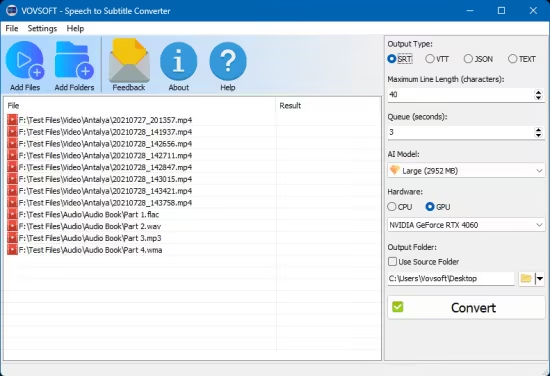
Vovsoft Speech to Subtitle Converter
Vovsoft Speech to Subtitle Converter is an automatic speech conversion software to convert voice into subtitles, supporting more than 50 languages. It effortlessly synchronizes texts with the corresponding timestamps. This audio to subtitle utility can save you hours transcribing audio and video files.
This program supports VTT and SRT subtitle formats. VTT is the format used in Youtube and Zoom transcriptions. SRT is the most popular video/movie subtitle filetype.
Video to subtitles converter
In addition to audio files (MP3, FLAC, WAV, OGG), this application also supports video files such as MP4, WEBM, MKV, AVI, MPEG, MOV, WMV, FLV, TS. It will automatically extract speech from any video file and convert to subtitles.
Automatic speech to subtitles conversion
If you have recorded some important lectures or speeches and want to create closed captions (CC), you can either go the manual route of listening to the speech and typing the text or you can make use of the recent developments in the artificial intelligence (AI). Vovsoft Speech to Subtitle Converter is such an AI powered software that can take your audio files and produce very accurate subtitles.
System Requirements: Windows 11, Windows 10 (32-bit & 64-bit)
What's new
- Added GPU-accelerated offline Whisper support via FFmpeg
Images
Download links
How to install VovSoft Speech to Subtitle Converter 2.0?
1. Download the ZIP file.
2. Install the Split APKs Installer application
3. Open the application and click on "Install".
4. Find the folder where the downloaded ZIP is located and select it.
5. Follow the steps that appear on the screen.







