
SmartGit Multilingual
133.6 MB
26.1.045
Windows 10+ (64-bit)
6645
Description
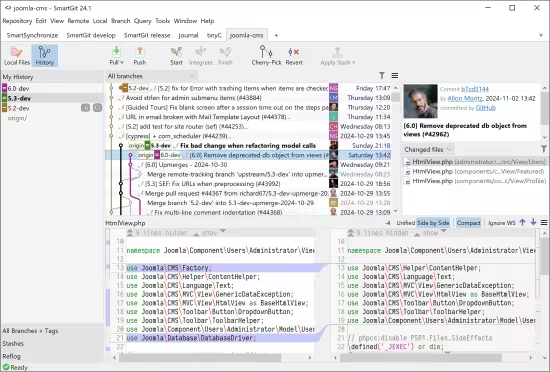
SmartGit
SmartGit is the most popular Git GUI client at slant.co. 100,000+ developers around the world trust in SmartGit. SmartGit supports GitHub, Bitbucket, GitLab and Azure DevOps.
Why prefer SmartGit as Git Client?
One for All.
SmartGit assists Git newbies as well as it makes experienced developers more productive.
SmartGit has the same intuitive user interface on Windows, macOS and Linux
graphical merge and commit history
drag and drop commit reordering, merging or rebase
fast, even for larger repositories
Use your SmartGit license on as many machines and operating systems you like.
Interacting with popular platforms.
SmartGit comes with special integrations for GitHub, Azure DevOps, BitBucket (as well BitBucket Server) and GitLab to create and resolve Pull Requests and Review Comments.
Of course, you can use SmartGit like any other Git client with your own Git repositories or other hosting providers.
Everything Included.
No need to install and configure additional tools. SmartGit includes all you need
intuitive File Compare (no plain wrapper around git diff)
powerful File Merge (freely editable “Conflict Solver”)
Git-Flow (high-level branch handling)
graphical Merge and Commit History
bundled Git client
SSH-client
Adopt to Your Needs and Workflows.
A perfect Git client should support your workflows. You can customize SmartGit in various ways
Preferences for Merging, Rebasing
External tools,
External or built-in Compare or Conflict Solver tools,
Syntax coloring,
Keyboard shortcuts,
Layout of certain views,
Toolbars,
Light and dark themes
System Requirements: Windows 10+ (64-bit)
What's new
SmartGit 26.1 brings a broader UI refresh together with clearer graph and worktree workflows, including:
- A refreshed look with reworked icons, compare colors, and dark theme refinements
- Git 3.0 support for SHA-256 repositories and reftable refs
- New GitLab support in the Standard window with merge requests, CI, browsing, and issue-based commit messages
- Better worktree visibility, synchronization, and Graph interaction
- Commit Overlap
- Easier discovery of SmartGit’s main windows
- Custom Ask AI prompts,
{{ branch }}templates, and AI support for merge commits - Reworked provider configurations in the Standard and Log windows
- Clearer Pull behavior in multi-remote repositories
Images
Download links
How to install SmartGit 26.1.045 Multilingual?
1. Download the ZIP file.
2. Install the Split APKs Installer application
3. Open the application and click on "Install".
4. Find the folder where the downloaded ZIP is located and select it.
5. Follow the steps that appear on the screen.







