
PrintHarbor Printer Manager
335.21 MB
1.0.0
Windows 10 version 1809 or later, 64-bit.
6484
Description
PrintHarbor Printer Manager
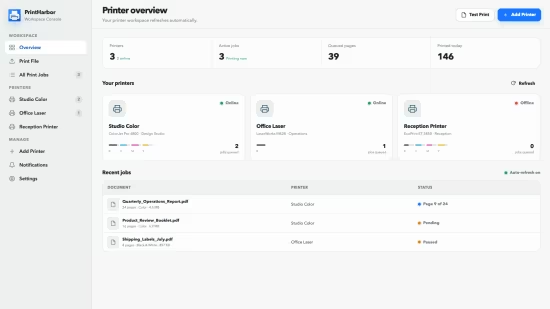
A calmer Windows printing workspace. Keep every print job in view. Discover printers, monitor queues, control jobs, and print PDFs or images without jumping between scattered system screens. One place for everyday printing. Everything you need to understand what your printers are doing and keep work moving.
Discover printers
See printers already configured in Windows and find compatible devices on your local network.
Live printer status
Check availability, connection details, queue activity, and recent jobs in a focused overview.
Queue control
Pause and resume printer queues when work needs to be held or released.
Job management
Pause, resume, cancel, filter, and bulk-manage jobs without losing context.
Print documents
Send PDF, PNG, JPG, and JPEG files with practical paper, copy, color, and duplex options.
Diagnostic pages
Print a built-in test page to check connectivity, alignment, margins, and color output.Release Notes
System Requirements
Windows 10 version 1809 or later, 64-bit.
What languages are supported?
The interface supports English, Simplified Chinese, Traditional Chinese, Japanese, Korean, French, German, Spanish, and Italian.
What's new
- Release notes were unavailable when this listing was updated.
Images
Download links
How to install PrintHarbor Printer Manager 1.0.0?
1. Download the ZIP file.
2. Install the Split APKs Installer application
3. Open the application and click on "Install".
4. Find the folder where the downloaded ZIP is located and select it.
5. Follow the steps that appear on the screen.







