
Neevia Document Converter Pro
61.7 MB
7.7.0.292
Windows 11, 10, 8, and 7 (both 32-bit and 64-bit)
8795
Description
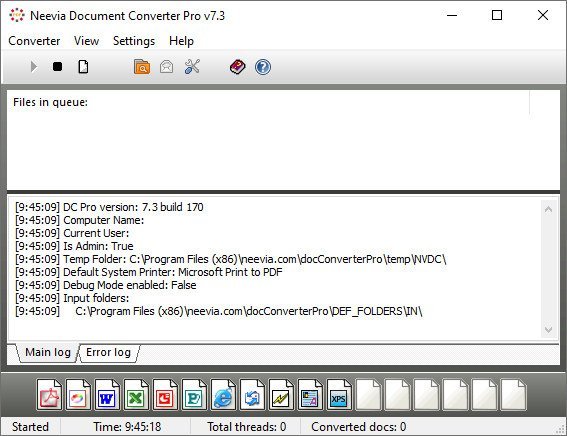
Neevia Document Converter Pro
Neevia Document Converter Pro is a software product that dynamically converts Microsoft Office 2007/2010/2013/2016/2019/365, WordPerfect, HTML, AutoCAD DWG/DWF, EML, MSG, PostScript and many other document types to PDF, PDF/A, PostScript, JPEG, TIFF, PNG, PCX, BMP. It operates in both a batch mode via directory or email scanning and in direct mode via a COM object or .NET component. Document Converter can be configured to recognize text – this is known as OCR – for the converting Image and PDF files and comes with support for printing the input files directly to a physical printer instead of converting them to PDF or Image.
With clustering support and multi-threaded conversion Neevia Document Converter Pro is the only document conversion software that offers 100% conversion stability.
Document Converter Pro is easy to install and is used by companies in the legal, pharmaceutical, insurance and in many other areas that generate voluminous documents. The goal of Neevia Document Converter Pro is to help your company create one PDF/Image standard that can be integrated into your workflow with ease and affordability.
KEY FEATURES
• Unlimited number of conversions;
• Multi-threaded conversion;
• Multiple input folders, each with its own configuration;
• Conversion scheduler;
• Monitor and convert files from multiple eMail accounts;
• Failover and high performance clustering support – more info;
• Support for recognizing text – known as OCR;
• No Adobe software required;
• Support for over 300 file types;
• Convert HTML files with support for CSS, SSL, Java and Flash images;
• Convert MS Word hyperlinks/headings to pdf links/bookmarks;
• Convert MS Word form fields into PDF form fields;
• Font embedding, resolution, compression and multi-language support;
• 128/256 bits PDF encryption; Encrypt existing PDF files;
• Convert MS Excel hyperlinks/headings to pdf links/bookmarks;
• Convert MS Powerpoint hyperlinks/headings to pdf links/bookmarks;
• PDF merge and split functionality;
• Add watermark and stationery – unicode fully supported; Stamp existing PDF files;
• COM object and .NET component included for on the fly conversion;
• Run as a Windows service;
• Convert to PDF, PostScript, TIFF (including Class F), BMP, PNG, PCX, JPEG;Release Notes
System Requirements: Windows 11, 10, 8, and 7 (both 32-bit and 64-bit)
What's new
Changed
- updated PDF generation engine;
- new HTML parser;
- new EMAIL parser;
- new Image parser;
- improved support for Windows Server 2025;
- improved support for Libre Office;
Fixed
- minor bug fixes;
Images
Download links
How to install Neevia Document Converter Pro 7.7.0.292?
1. Download the ZIP file.
2. Install the Split APKs Installer application
3. Open the application and click on "Install".
4. Find the folder where the downloaded ZIP is located and select it.
5. Follow the steps that appear on the screen.







