
Exiland Backup Professional Multilingual
20.4 MB
7.2
OS: Windows XP and later, Windows Server RAM: 128 MB Free disk space: 16 MB Screen resolution: 800x600 or higher
8754
Description
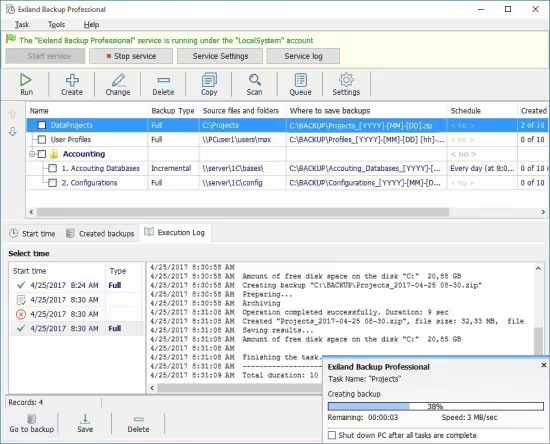
Exiland Backup Professional
Exiland Backup Professional is the full-featured edition. It includes all the features of the Standard edition, plus it allows you to back up files from multiple PCs through local network, back up of open (locked) files using VSS (Volume Shadow Copy), FTP, SFTP (SSH) and save backups to any storage. The Professional edition runs as a Windows service in background regardless of user sessions. It is excellently suited for backing up any data in local network: work documents, MS Outlook files (*.ost, *.pst), MS Exchange, database files, website files, user profiles, etc. It gives you full control over the backup creation.
The Exiland Backup Professional includes the following two components
Administration tool (can be used for configuring tasks)
Windows service (executes the configured tasks running in background)
Key features of Exiland Backup Professional
Supports four backup types: Full, Incremental, Differential, and Synchronization of files
Backs up open (locked) files used by another applications such as MS Outlook (*.pst, *.ost), MSSQL (*.mdf, *.ldf), and etc. (VSS – Volume Shadow Copy)
Can copy files from different computers through LAN
Backs up the data from local and network drives, removable devices, flash drives, NAS, FTP, SFTP (SSH) servers
Uses fast multi-threaded copying
Compresses the data using the Standard ZIP format, strong AES encryption; supports of archives greater than 2.1 GB
Runs as a Windows service
Accesses network folders using the specified account (login and password)
Duplicates backups
Logs all the backup operations
Supports three types of notifications: e-mail, SMS, or screen
Allows the users to view and restore files from backups
System Requirements
OS: Windows XP and later, Windows Server
RAM: 128 MB
Free disk space: 16 MB
Screen resolution: 800×600 or higher
What's new
- - Drag & Drop files from Explorer to the source file list
- - Ability to COPY / PASTE of the source paths list manually
- - Export a backup job list to a Word file (.docx)
- - Improved the "By event (trigger)" schedule: you can now select days of the week
- - The program was translated into Simplified Chinese
- - Increased the font size in the Execution Log by 1 pixel
- - Solved the synchronization problem that caused the program to incorrectly detect files as modified
- - Added the "Select All" context menu item to the backup list
- - Ability to select the position of the tooltip on the screen
- - Disabled the check for availability of the main storage before scanning source files
- - Disabled autostart of interrupted jobs
- - Improved error handling
- - Fixed other bugs and defects
Images
Download links
How to install Exiland Backup Professional 7.2 Multilingual?
1. Download the ZIP file.
2. Install the Split APKs Installer application
3. Open the application and click on "Install".
4. Find the folder where the downloaded ZIP is located and select it.
5. Follow the steps that appear on the screen.







