
Chaos Envision
1.42 GB
1.7.0
Microsoft Windows 10 with Update 2004 (version 10.0.19041) or newer
8464
Description
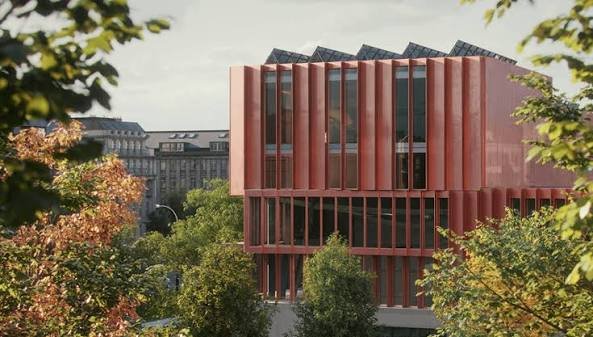
Chaos Envision
Immersive architectural experiences. Real-time 3D assembly, photorealism, and animations.
Let your design speak for itself with Chaos Envision.
For architects and archviz specialists who want to elevate their design effortlessly.
Scene scaling
As a standalone tool, Envision goes beyond the common CAD limitations and makes it possible to create detail-heavy scenes without compromising on performance or quality.
Robust assembly
Combine scene elements from various 3D creation tools with no data prep or loss.
Real-time realism
Dive into intricate, high-complexity designs with fast performance and visual fidelity.
Creative flexibility
Adjust any aspect of your project without needing to pre-separate objects — data is imported at the object level of granularity.
Cinematic storytelling
Communicate architectural intent and captivate stakeholders with interactive, cinematic, and emotionally compelling visual stories that are intuitive, easy and fast to create.
Advanced animations
From moving objects on paths to showing construction phasing, design variations and cinematic flyovers.
Immersive environments
Adjusting time of day, cloud appearance and haze sets the mood, while animated vegetation and wind effects create a lively feel of the environment.
4D humans and crowds
Bring designs to life with crowds of animated humans – thanks to the direct integration of the Anima engine.
High-end visual realism
Powered by a high-fidelity ray tracing engine, Envision supports trillions of polygons in real-time, allowing users to populate their scenes with high-quality assets.
100% ray-tracing
High-end visual fidelity in both real-time and offline output.
Cosmos library
Render-ready assets, recognized for their rich geometry, advanced materials, dynamic lighting, and lifelike entourage.
AI enhancements
Enhance vegetation and human figures with AI-driven textures, lighting, and clarity.
Design exploration
Research lighting scenarios, materials, and entourage options and see them demonstrated through animated transitions between design variations.
Unlimited variations
Create variations of any adjustable object, material, light, or asset of your scene and explore design options.
Interactive walkthroughs
Seamlessly animate between variations to create immersive walkthroughs and over-the-shoulder presentations.
Intuitive visual presets
One-click effects like rounded corners, translucency, strands, and displacement elevate realism and enhance the natural look of your scenes.
Ecosystem
Seamlessly integrated with the Chaos ecosystem, Envision works with Enscape and V-Ray, offering a natural continuation to their workflows for fluid data exchange and streamlined collaboration.
Easy coordination (.vrscene)
Leveraging the .vrscene format, Envision loads scene data instantly and supports all assets and materials coming from the creation tools.
Non-destructive workflow
Design iterations do not restart the visualization process and minimize repetitive artist work.
Continuous design
Visualization stays up to date even as design evolves thanks to advanced file linking.
System Requirements: Microsoft Windows 10 with Update 2004 (version 10.0.19041) or newer
What's new
New Features
-
Integrated Chaos Veras into Envision
-
Assistant tools
-
Scatter Assets on Selection - ability to find and scatter assets on selected surfaces
-
Place Assets on Plane - ability to find and place asset sets on planes, available for dining, living room, and bedroom areas
-
Render Critique - designed to analyze the user's current viewport render and provide concise, actionable feedback on its visual and technical quality.
-
Modified Features
-
Redesigned and improved onboarding experience for a smoother first-time setup
-
Added thumbnail keyframe track in Easy Mode for faster timeline navigation
-
Improved camera keyframe blending to preserve horizon alignment and prevent roll/tilt during transitions
-
Added Kelvin temperature presets to native lights
Fixes
-
Adding environment variation to the timeline adds it to the Camera viewpoints as well
-
Interpolation issues with orientation of animated Cameras
-
Crash when switching to another window while loading scene
-
Onboarding text overlaps during UI/mode selection on startup
-
Variated wind transitions cause reversed motion in water shader
-
Live-link Switching the material of a grouped/component object to Mix or Water is not working
-
Imported camera animation in Envision does not match the camera animation in Enscape
-
It's not possible to download / save a render from Veras
-
GPU OOM Critical Error when starting a second render in scenes containing Anima
-
Fix light theme Assistant logo
-
Timeline playhead stalls with 4D Anima characters
-
Update the card texts in the Getting started section of the Home screen
-
Custom FPS option cannot be configured in Easy mode
-
Foliage enhancement triggers material UI property switch
-
Camera clip property dropdown creates unintended keyframes
-
Transition properties window gets cropped and cannot be moved depending on animation panel height
-
Audio track can't be deleted
-
Audio track labeled "Additional" instead of "Audio" in Easy mode
-
Switching from Easy to Advanced mode is not exposing the existing audio track
-
Audio playback is disabled if audio channels are not explicitly added in older scenes/documents
-
Advanced mode properties remain active and unresponsive after switching to Easy mode
-
Timeline playback continues after switching application mode.
-
Material preview window persists across GUI states and cannot be restored
-
Broken orientation of grouped assets imported from Enscape/AECs
-
The light color temperature slider text and Kelvin value are hard to read
-
Change IES tooltip
-
Switching from Advanced to Easy mode retains the advanced created object active
-
TimelineCameraTrack.cpp, access key interpolation property during confirmation dialog
-
Viewport rendering resolution widgets lack light theme equivalent
-
Delete camera clip button still visible when it's already deleted
-
Advanced mode lister filters persist in Easy mode
-
UI texts that are not looking good
-
Editing the timeline length box is hard to see when switching themes
-
Live-link icon is darker when Envision is started with the Light theme and switched to the Dark theme
-
Top layer thumbnail is lost after duplicating material while general material preview is active
-
Wrong camera thumbnails when opening a scene
-
Changing between cameras is not updating the thumbnails properly
-
Camera previews have wrong aspect ratio
-
Camera directional lock persists when action is interrupted
-
Resizing clips on timeline tracks doesn’t work at the first pixel on either side.
-
Timeline zoom slider not showing up on scene load.
-
Timeline zoom slider missing its hover effect.
-
Keyframes outside the camera timeline clip not updating their visibility instantly on button click.
-
After deleting an audio clip from the timeline track, the “Open audio file” dialog shows up when another audio clip is clicked.
-
Audio clips being able to switch timeline tracks with dragging when the target track is not visible.
-
Audio playback from hidden audio tracks after loading a scene.
Images
Download links
How to install Chaos Envision 1.7.0?
1. Download the ZIP file.
2. Install the Split APKs Installer application
3. Open the application and click on "Install".
4. Find the folder where the downloaded ZIP is located and select it.
5. Follow the steps that appear on the screen.







