
BorisFX SoundApp ARA2
870.3 MB
2026.5.17
Windows 10/11 64-bit (32-bit isn’t supported)
8724
Description
BorisFX SoundApp ARA2
AI Tools That Instantly Improve Audio.
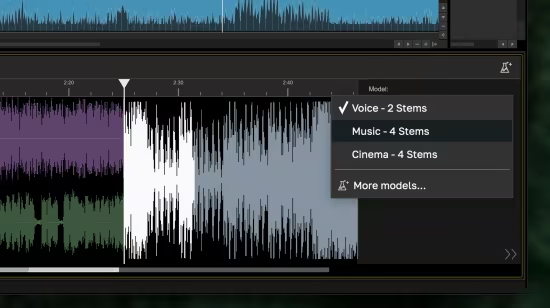
Separate Instruments
Split any music track into vocals, drums, bass, and other (guitar, synth, and more).
Isolate Voice from Music
Cleanly separate, adjust, or remove voice from music, whether in the studio or the field.
Deconstruct Cinematic Scenes
Remove, mix, or extract music, sound effects, background noise, or dialogue from fully rendered scenes.
Denoise, Level, and Enhance
Instantly remove noise, echo, wind, and more while auto-adjusting levels and enhancing clarity.
Whats New
Updates: official site does not provide any info about changes in this version
System Requirements: Windows 10/11 64-bit (32-bit isn’t supported)
What's new
- Resolve: Improved the behavior of AdvancedDefocus on * Resolve on large resolutions. This should prevent timeout errors.
- Premiere: fixed a crash when attempting to export with BRAW files.
- Grunge: Fixed a bug in 6 Grunge presets where they had the wrong combine mode.
- Mocha: Fixed a bug where the Sapphire instance of Mocha would show up in the Open With menu on macOS when trying to open Mocha projects.
- Flare Designer: Improved the behavior of the vary-spacing option in multi-spot.
- Flare Designer: Fix a minor UI bug in the Flare Designer with elements with a follow mode.
- Builder: Fixed a confusing label in the Dots and Noise tools inside Builder.
- Miscellaneous improvements to the Configuration Editor tool.
- Fixed a crash in the Flare Designer, Preset Browser, and Effect Builder if the OCIO directory was corrupt or incomplete.
- Avid: Fixed an issue where PanAndZoom could not load images with whitespaces in the filename or path.
Images
Download links
How to install BorisFX SoundApp ARA2 2026.5.17?
1. Download the ZIP file.
2. Install the Split APKs Installer application
3. Open the application and click on "Install".
4. Find the folder where the downloaded ZIP is located and select it.
5. Follow the steps that appear on the screen.







