
AI Text to Speech
686.15 MB
1.0.15
- OS: Windows 10 version 17763.0 or higher - Memory: 4 GB (Minimum), 8 GB (Recommended) - Processor: 64-bit dual-core 2.0 GHz (Minimum), 64-bit quad-core 3.0 GHz (Recommended)
4875
Description
AI Text to Speech
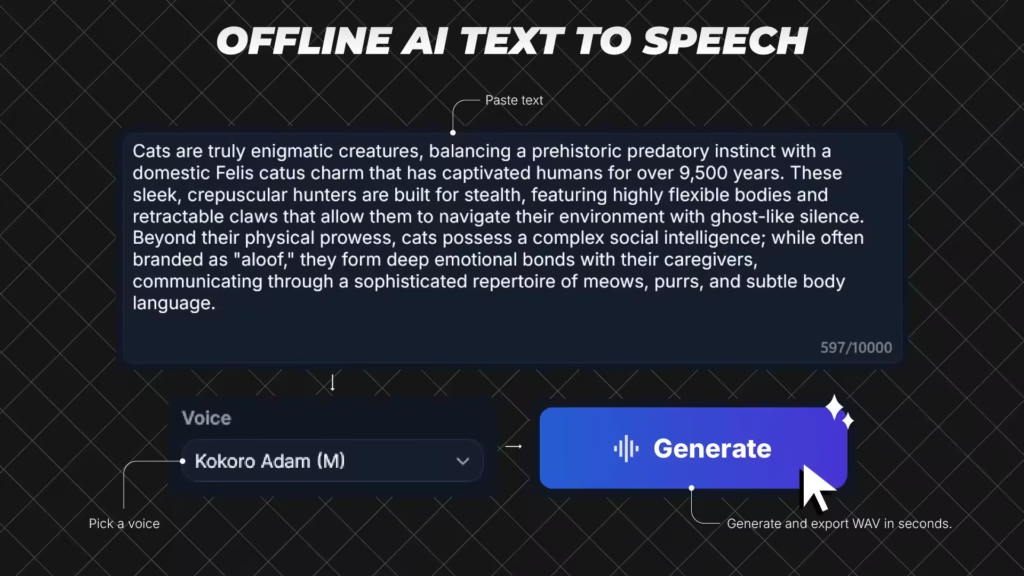
AI TTS is an offline Windows desktop AI text-to-speech app for fast local voice generation. Paste your script, choose a model and voice, generate speech, preview the result, and export WAV files. AI TTS is built for creators, students, and professionals who want a fast, repeatable desktop TTS workflow.
Choose the model that fits your workflow
– Kokoro-82M (Balanced): better voice quality for final narration
– KittenTTS (Fast): quicker drafts and iterations
Core workflow
1) Paste text
2) Pick model + voice
3) Generate
4) Preview
5) Export
Key Capabilities
– Local AI synthesis workflow (no cloud API key required)
– Up to 10,000 characters per generation
– Automatic chunking for long scripts to keep generation stable
– Speed control from 0.50x to 1.50x
– Preview player with play/pause, seek, and preview history navigation
– Manual export mode: choose save location when exporting
– Auto export mode: save directly to your configured output folder
– Inference hardware preference in settings (Auto / CPU / GPU)
– Dark and light themes
– In-app logs, notices, and license references
– Built-in settings for defaults and export behavior
AI TTS is built for creators, students, and professionals who want a fast, repeatable desktop TTS workflow.Release Notes
System Requirements
– OS: Windows 10 version 17763.0 or higher
– Memory: 4 GB (Minimum), 8 GB (Recommended)
– Processor: 64-bit dual-core 2.0 GHz (Minimum), 64-bit quad-core 3.0 GHz (Recommended)
What's new
Added multilingual text-to-speech support
- Added a new Language dropdown beside voice selection
- Added Auto-detect as the default language option
- Added support for English (US), English (UK), Spanish, French, Italian, Hindi, Brazilian Portuguese, and Mandarin Chinese
- Improved voice filtering so voices match the selected language
- Added language info to preview/export metadata
- Improved multilingual generation reliability
- Fixed an auto-detect issue when no text is entered
Images
Download links
How to install AI Text to Speech 1.0.15?
1. Download the ZIP file.
2. Install the Split APKs Installer application
3. Open the application and click on "Install".
4. Find the folder where the downloaded ZIP is located and select it.
5. Follow the steps that appear on the screen.







